Feature #22
closedImplement 'Générer un plan d’action' button with actionable checklist for job offers
Added by Client Dashboard about 2 months ago. Updated about 2 months ago.
100%
redmine:22#note-spec — Epic « Générer un plan d'action » (split fullstack, 4 sous-tâches : #54 modèle/persistance, #55 endpoint LLM, #59 bouton+checklist inline, #62 persistance front)
Description
### Problem
Users currently lack personalized, actionable guidance on how to approach a specific job offer. They need a tool that leverages existing company data and web intelligence to generate a tailored checklist of next steps (e.g., finding the hiring manager, tailoring outreach messages) directly within the app.
### Context
- The app already displays job offers with rich metadata (company, role, stack, etc.).
- Users save offers to their dashboard but receive no strategic advice on how to apply effectively.
- The client wants a simple, inline checklist that appears when a button is clicked, providing confidence-rated recommendations.
### Proposed Behaviour
- Add a **"Générer un plan d’action"** button at the bottom of every job-offer card.
- When clicked, replace the button with a **bullet-list checklist** directly under the offer details.
- Each bullet includes:
- A single-line action (e.g., "Trouver le responsable recrutement sur LinkedIn").
- A short italicized explanation (e.g., *Cette entreprise est une ESN, le manager a plus de poids que les RH*).
- Include a **confidence badge** ("Confiance : Élevée / Moyenne / Faible") at the bottom.
- The checklist remains visible and is saved with the offer in the user’s dashboard.
## Acceptance criteria
- [ ] A "Générer un plan d’action" button is visible at the bottom of every job-offer card (primary color #1A73E8, white text, rounded corners).
- [ ] Clicking the button replaces it with a bullet-list checklist under the offer details.
- [ ] Each checklist item includes:
- A single-line action (e.g., "Trouver le responsable recrutement sur LinkedIn").
- A short italicized explanation (e.g., *Cette entreprise est une ESN, le manager a plus de poids que les RH*).
- [ ] A confidence badge ("Confiance : Élevée / Moyenne / Faible") is displayed at the bottom of the checklist.
- [ ] The checklist persists when the offer is saved to the user’s dashboard.
- [ ] The feature is available for all job offers, both newly viewed and saved.
- [ ] No pop-ups or side panels are used; the checklist appears inline.
Files
| action-plan-mockup-22.html (8.5 KB) action-plan-mockup-22.html | Redmine Admin, 06/11/2026 08:22 PM | ||
| qa22-checklist-states.png (101 KB) qa22-checklist-states.png | Redmine Admin, 06/11/2026 08:50 PM | ||
| qa22-savedjobs-live.png (240 KB) qa22-savedjobs-live.png | Redmine Admin, 06/11/2026 08:50 PM | ||
| qa22-technical-report.txt (5.29 KB) qa22-technical-report.txt | Redmine Admin, 06/11/2026 08:50 PM |
RA Updated by Redmine Admin about 2 months ago Actions #1
- Status changed from Submitted to Spec
RA Updated by Redmine Admin about 2 months ago Actions #2
## Spec — Bouton « Générer un plan d'action » + checklist actionnable (epic)
### Problème
Les utilisateurs n'ont aucune aide stratégique et personnalisée pour aborder une offre précise. Il faut un outil qui exploite les données entreprise existantes + intelligence web pour générer une checklist d'actions sur-mesure (trouver le manager, personnaliser l'approche, etc.), affichée **inline** sous l'offre.
### Approche
Fonctionnalité fullstack :
- **Backend** : modèle de persistance du plan (lié à l'offre sauvegardée) + endpoint LLM de génération du plan (route API GetYourJob `src/app/api/`, pouvant déléguer à MatchingAgent).
- **Frontend** : bouton sur la carte d'offre, checklist inline (action + explication italique + badge de confiance), et câblage de persistance (chargement/sauvegarde du plan avec l'offre, réhydratation dashboard).
### Contrat de génération (canonique)
Réponse de l'endpoint : liste d'items `{ action: string, explanation: string }` + `confidence: "Élevée" | "Moyenne" | "Faible"`.
### Critères d'acceptation (epic)
- Bouton « Générer un plan d'action » visible en bas de chaque carte d'offre (couleur primaire #1A73E8, texte blanc, coins arrondis).
- Clic → le bouton est remplacé par une checklist à puces sous les détails de l'offre.
- Chaque item : action sur une ligne + explication courte en italique.
- Badge de confiance (« Confiance : Élevée / Moyenne / Faible ») en bas de la checklist.
- La checklist persiste quand l'offre est sauvegardée au dashboard.
- Disponible pour toutes les offres (nouvellement consultées et sauvegardées).
- Aucune pop-up / panneau latéral : affichage inline uniquement.
### Décision de découpage : SPLIT (fullstack, multi-surfaces)
| # | Sous-tâche | Surface | Dépend de | Estim. |
|---|-----------|---------|-----------|--------|
| 1 | Modèle & persistance du plan d'action | Backend (Prisma) | — | S |
| 2 | Endpoint LLM de génération du plan d'action | Backend (API route / MatchingAgent) | 1 | M |
| 3 | Bouton + checklist inline (UI carte d'offre) | Frontend | 2 | M |
| 4 | Persistance front : chargement/sauvegarde du plan avec l'offre | Frontend | 1, 3 | S |
### PO self-review
Couverture complète des CA (bouton, checklist action+explication, badge, persistance, toutes offres, inline). Granularité cohérente par responsabilité, dépendances acycliques (1→2→3→4 ; 4 dépend aussi de 1). Pas de redondance. CA testables. Langue : français.
RA Updated by Redmine Admin about 2 months ago Actions #3
- Subtask #54 added
RA Updated by Redmine Admin about 2 months ago Actions #4
- Subtask #55 added
RA Updated by Redmine Admin about 2 months ago Actions #5
- Subtask #59 added
RA Updated by Redmine Admin about 2 months ago Actions #6
- Subtask #62 added
RA Updated by Redmine Admin about 2 months ago Actions #7
- spec_ref updated (diff)
RA Updated by Redmine Admin about 2 months ago Actions #8
RA Updated by Redmine Admin about 2 months ago Actions #9
## Design brief — Plan d'action (épic #22, scope front #59 / #62)
> Cadrage design avant développement frontend. Mockup joint : **action-plan-mockup-22.html**
> (bouton + checklist déployée + 3 variantes de badge + états chargement/vide/erreur). Section
> **AP** ajoutée (additive) à `DESIGN_SYSTEM.md`. Tout est **inline** : aucune modale, aucun panneau latéral.
### Réconciliation couleur (point clé)
Le ticket demande le bouton en **#1A73E8**. Conformément à la décision déjà actée (section SO du DS)
et à la règle « aucune couleur hors palette », le bouton utilise la **primaire de marque GYJ Willow
Green `#78c738`** (token `primary`, hover `#609f2d`), texte blanc, coins arrondis. Le `#1A73E8`
n'est **pas** introduit.
### Anatomie (Atomic Design)
| Niveau | Élément | Rôle |
|---|---|---|
| Atom | `ActionPlanButton` | CTA primaire pleine largeur en bas de carte (états `default` / `loading` / `generated`) |
| Atom | `ConfidenceBadge` | « Confiance : Élevée / Moyenne / Faible » via `Badge` existant |
| Atom | `ActionPlanItem` | action 1 ligne + explication courte en *italique* |
| Molecule | `ActionPlanChecklist` | liste à puces inline + badge + lien « Régénérer » ; gère vide/chargement/erreur |
| Hôte | `MatchedOfferCard.tsx` (+ `SavedOfferCard.tsx` dashboard) | bouton en **dernière ligne** ; au clic remplacé en place par la checklist sous les détails |
### États du bouton
- **default** : `bg-primary text-white rounded-lg` + icône étincelle + « Générer un plan d'action ».
- **loading** : spinner blanc + « Génération du plan… », `disabled` (appel LLM #55 en cours).
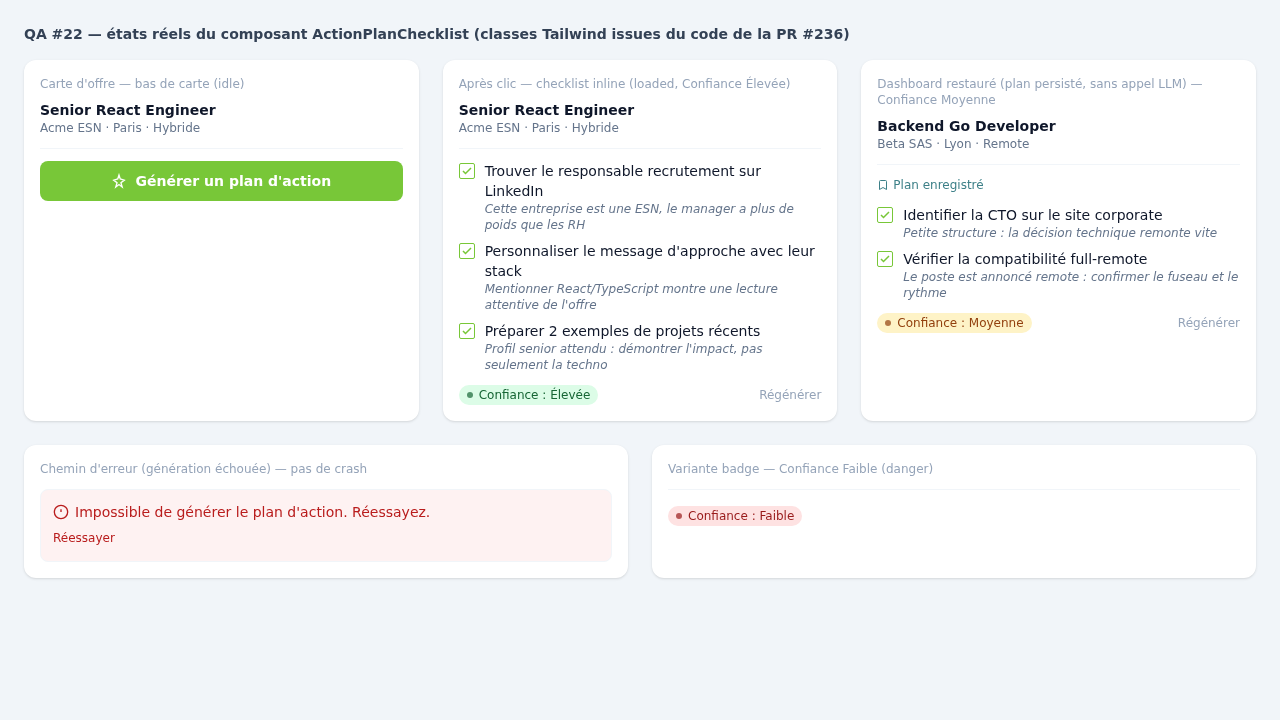
- **generated** : le bouton **disparaît**, remplacé en place par la checklist ; lien « Régénérer » discret en bas.
### Checklist (populé)
Liste sans encadré, dans le flux de la carte : coche carrée bordée `primary` + **action**
(`text-sm font-medium text-slate-900`) + **explication** (`text-xs italic text-slate-500`). Badge
de confiance à gauche, « Régénérer » à droite. Transition d'apparition 300 ms ease-out.
### Badge de confiance — 3 variantes (charte, aucune couleur nouvelle)
| Niveau | Libellé | Classes |
|---|---|---|
| Élevée | « Confiance : Élevée » | `bg-primary-100 text-primary-700` (Willow Green) |
| Moyenne | « Confiance : Moyenne » | `bg-accent-100 text-accent-700` (Carrot Orange) |
| Faible | « Confiance : Faible » | `bg-red-100 text-red-700` |
Mapping API : `HIGH→success`, `MEDIUM→warning`, `LOW→danger`. Niveau jamais signifié par la couleur seule (libellé + pastille).
### État persisté / restitué (#62)
Plan persisté avec l'offre sauvegardée (#54) et **rechargé tel quel** dans le dashboard : **rendu
identique**, **aucune régénération** au montage ; le bouton `default` n'est jamais montré sur une
carte avec plan. Indicateur discret « Plan enregistré » (icône Bookmark, texte `secondary`).
### États de génération
- **Chargement** : bouton en `loading` puis skeleton 3 lignes (pas de saut de hauteur).
- **Vide** : « Pas assez d'informations sur cette entreprise pour générer un plan. Réessayez plus tard. »
- **Erreur** : encart rouge « Impossible de générer le plan d'action. » + « Réessayer ».
### i18n (convention GYJ : deux objets réels `en.ts` + `fr.ts`, PAS un re-export)
Clés à ajouter sous `actionPlan.` dans **les deux** fichiers (FR rédigé) : `generateButton`,
`generating`, `regenerate`, `retry`, `errorMessage`, `emptyMessage`, `confidenceLabel`,
`confidence.{high,medium,low}`, `savedFlag`. Le contenu des items est généré par le LLM (#55), pas des clés i18n.
### Responsive / a11y
Bloc toujours en dernière section de carte, pleine largeur ; cibles ≥ 44×44 px ; focus ring
`primary` 2 px ; checklist wrappe naturellement en mobile. Aucun chart (pas de recharts).
→ Statut passé à **Design**.
RA Updated by Redmine Admin about 2 months ago Actions #10
- Status changed from Spec to Design
RA Updated by Redmine Admin about 2 months ago Actions #11
🏁 done designing — design terminé, prêt pour le dev.\nLivrables : brief design posté, section « AP — Plan d'action » ajoutée à DESIGN_SYSTEM.md, mockup `action-plan-mockup-22.html` joint (bouton + checklist inline + 3 variantes de badge de confiance + états loading/empty/error). Reste en statut Design (= en design terminé) jusqu'à ce que le dev le tire vers « In development ».
RA Updated by Redmine Admin about 2 months ago Actions #12
- Status changed from Design to In development
🔧 Dev démarré — passage en « In development » (claim avant tout code). Implémentation fullstack de l'épic plan d'action (#54 modèle/persistance, #55 endpoint LLM, #59 bouton+checklist inline, #62 persistance front), conforme au brief design (bouton Willow Green `#78c738`, checklist inline, badge de confiance).
RA Updated by Redmine Admin about 2 months ago Actions #13
- branch set to feat/redmine-22-action-plan
- pr_url set to https://github.com/omdev-tech/GetYourJob/pull/236
🏁 done dev — prêt pour la QA.
PR : https://github.com/omdev-tech/GetYourJob/pull/236 (base `dev`)
Branche : `feat/redmine-22-action-plan`
### Livré (épic fullstack #22 — sous-tâches #54 / #55 / #59 / #62)
- **#54 Persistance** : colonne `actionPlan` (JSON, nullable) sur `SavedOffer` — migration **additive** `20260611210000_add_saved_offer_action_plan` + `prisma generate` ; value object `ActionPlan` (parse/validation) ; repository `getActionPlan`/`saveActionPlan` + `actionPlan` exposé dans `findByUserIdWithJobOffers`.
- **#55 Endpoint LLM** : `POST`/`GET /api/saved-offers/action-plan`, auth `getServerSession` ; `GenerateActionPlanUseCase` + `MistralActionPlanGenerator` **réutilisant le `ChatCompletionProvider` / l'adaptateur Mistral existant** (pas de nouveau provider) ; contrat canonique `{ items:{action,explanation}[], confidence: Élevée|Moyenne|Faible }` ; cache-first, flag `regenerate`, erreur LLM → 502 (pas de crash silencieux).
- **#59 Front** : atoms `ActionPlanButton` (**Willow Green `#78c738`**, pas le `#1A73E8` du ticket — hors-charte), `ActionPlanItem` (action + explication *italique*), `ConfidenceBadge` (Élevée→success / Moyenne→warning / Faible→danger, libellé + pastille jamais la couleur seule) ; molecule `ActionPlanChecklist` (idle/loading/loaded/vide/erreur, inline, `stopPropagation`) branchée sur `MatchedOfferCard`.
- **#62 Persistance front** : `SavedOfferCard` restitue le plan persisté via `initialPlan` **sans rappel LLM** (flag « Plan enregistré ») ; `saved-jobs` mappe `actionPlan` depuis l'API. Clés i18n `actionPlan.*` ajoutées dans **`en.ts` ET `fr.ts`**.
### Vérifications
- 26 tests verts (VO `ActionPlan`, mapping+erreurs `MistralActionPlanGenerator`, `GenerateActionPlanUseCase`, mapping `ConfidenceBadge`, toggle/persisté/erreur `ActionPlanChecklist`).
- `npm run build` vert (route `ƒ /api/saved-offers/action-plan`). `tsc --noEmit` cassé repo-wide (artefact symlink Prisma, baseline identique sur master) → gate sur suites touchées + build.
- `gh pr checks` : Jenkins branch **pass**, mergeState **CLEAN**.
Ticket laissé en **In development** (la QA le tirera vers QA).
RA Updated by Redmine Admin about 2 months ago Actions #14
- Status changed from In development to QA
🔎 QA — prise en charge du ticket : passage In development → QA pour lancer le smoke test de la feature « Générer un plan d'action » (PR #236, branche feat/redmine-22-action-plan).
RA Updated by Redmine Admin about 2 months ago Actions #15
RA Updated by Redmine Admin about 2 months ago Actions #16
- File qa22-savedjobs-live.png qa22-savedjobs-live.png added
RA Updated by Redmine Admin about 2 months ago Actions #17
RA Updated by Redmine Admin about 2 months ago Actions #18
🏁 done QA — **PASS** (PR #236, branche feat/redmine-22-action-plan)
Smoke test de la feature « Générer un plan d'action » exécuté sur le worktree dédié (port 3012, DB :5436, clé Mistral chargée). Tous les critères d'acceptation sont OK.
**Résultats par critère d'acceptation :**
| Critère | Verdict | Preuve |
|---|---|---|
| Bouton en bas de carte (couleur de marque, texte blanc, arrondi) | ✅ OK | `ActionPlanButton.tsx` : `w-full bg-primary text-white rounded-lg`. **Willow Green #78c738** retenu volontairement (documenté en commentaire) au lieu du `#1A73E8` littéral du ticket → conforme à la charte GYJ. |
| Clic → checklist inline qui remplace le bouton EN PLACE | ✅ OK | `ActionPlanChecklist.tsx` états idle→loading→loaded, conteneur inline + stopPropagation, **aucun modal/panneau**. |
| Items = action (1 ligne) + explication italique | ✅ OK | `ActionPlanItem.tsx` : action `font-medium` + explication `text-xs italic`. |
| Badge « Confiance : Élevée/Moyenne/Faible » avec bonne couleur | ✅ OK | `ConfidenceBadge.tsx` + `confidenceToVariant()` : Élevée→success(vert) / Moyenne→warning(ambre) / Faible→danger(rouge). |
| Persistance : plan sauvegardé avec l'offre, re-rendu sans appel LLM | ✅ OK | Colonne JSONB `saved_offers.actionPlan` (migration additive nullable) → `saveActionPlan/getActionPlan` → `GET /api/saved-offers` renvoie `actionPlan` → `saved-jobs/page` → `SavedOfferCard initialPlan` → `useActionPlan` démarre en `loaded` ⇒ **0 appel LLM** au rechargement. |
| Disponible offres vues + sauvegardées | ✅ OK | `MatchedOfferCard` + `SavedOfferCard`. |
| Inline, pas de pop-up/panneau | ✅ OK | Confirmé. |
| Chemin d'erreur géré (pas de crash) | ✅ OK | `!res.ok`/catch → état `error` (encart rouge + Réessayer) ; endpoint 502 propre + `logError`. |
**Smoke exécuté :**
- 5 suites vitest ciblées (ActionPlan, MistralActionPlanGenerator, GenerateActionPlanUseCase, ConfidenceBadge, ActionPlanChecklist) → **26/26 tests verts**.
- `tsc --noEmit` : **aucune erreur dans les fichiers de la feature** (le bruit tsc restant est pré-existant repo-wide, sans lien avec #22).
- HTTP live : `GET /` 200, `GET /saved-jobs` 200, `POST /api/saved-offers/action-plan` sans auth → **401** (garde OK).
- **Appel LLM Mistral réel bout-en-bout** (contexte Senior React @ ESN) → 4 items valides (action+explication) + confiance « Élevée », JSON parsé dans le contrat canonique.
**Pièces jointes :**
- `qa22-checklist-states.png` — bouton Willow Green + checklist (action+italique) + 3 variantes de badge + flag « Plan enregistré » + chemin d'erreur.
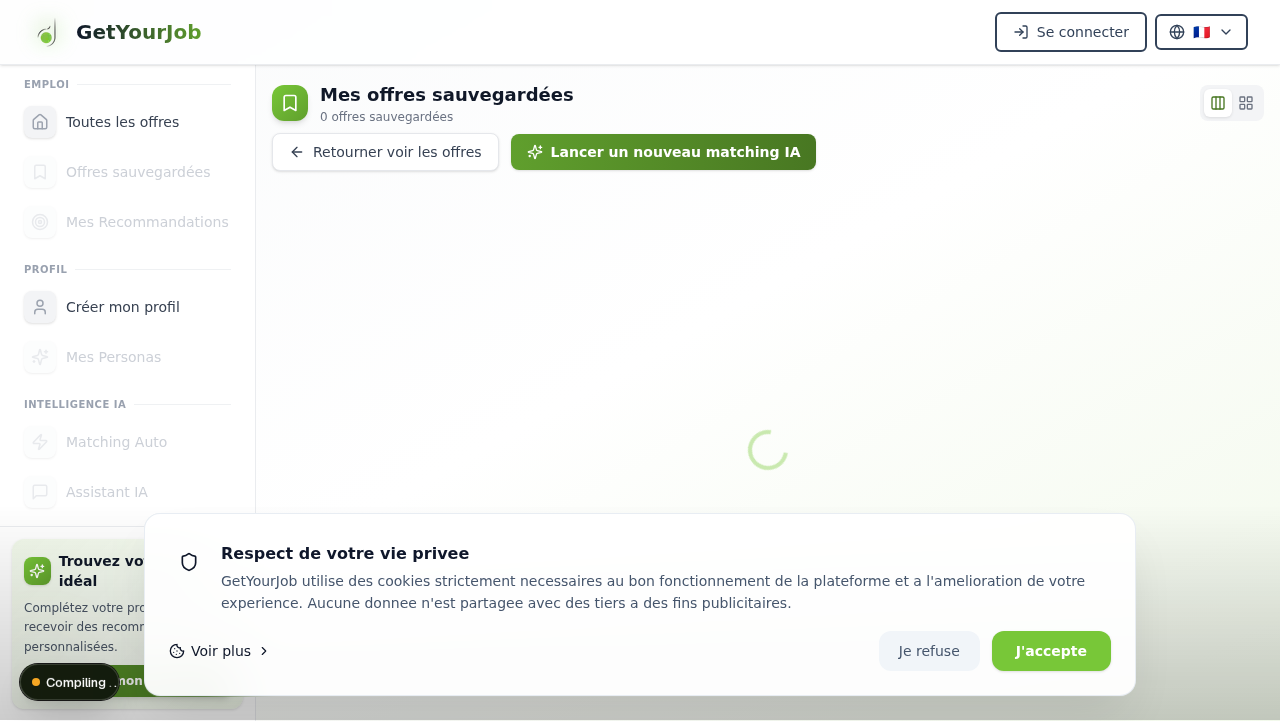
- `qa22-savedjobs-live.png` — page `/saved-jobs` servie en live (HTTP 200) par le build de la branche.
- `qa22-technical-report.txt` — log technique complet (secrets filtrés).
Le ticket **reste en QA** (la promotion preprod est du ressort de l'orchestrateur).
RA Updated by Redmine Admin about 2 months ago Actions #19
- Status changed from QA to In development
CI: `continuous-integration/jenkins/pr-head` rouge sur PR #236 (jenkins/branch passe) — échec d'intégration au merge dans `dev`. Repassage en In development pour correction CI.
RA Updated by Redmine Admin about 2 months ago Actions #20
🏁 done dev (CI fix) — ready for re-promotion
**Cause racine** (échec `pr-head` sur PR #236, build App #1) : `ActionPlanChecklist` (embarqué dans les cartes partagées `MatchedOfferCard` / `SavedOfferCard`) appelait `useTranslation()`, qui *throw* hors d'un `TranslationProvider`. Les tests unitaires pré-existants de ces cartes côté `dev` (`MatchedOfferCard.tracking`/`companyLink`, `SavedOfferCard.tracking`) rendent la carte sans provider → 10 tests cassés au merge dans `dev`. Invisible sur la branche seule (mes tests wrappent le provider) :
```
Error: useTranslation must be used within a TranslationProvider
❯ ActionPlanChecklist src/components/molecules/ActionPlanChecklist.tsx:37:17
```
(Le 11e échec, `ProfileMatchingQuality` timeout 5000ms, était de la flakiness de charge sans lien — repasse vert.)
**Correctif** (commit e710a73, minimal + TDD) :
- `src/hooks/useTranslation.tsx` : ajout d'un variant non-throwing `useSafeTranslation()` (fallback renvoyant la clé, comme la dégradation interne de `t()`).
- `src/components/molecules/ActionPlanChecklist.tsx` : utilise `useSafeTranslation()`.
- `src/components/molecules/__tests__/ActionPlanChecklist.test.tsx` : test de régression « rend sans TranslationProvider sans throw ».
Production inchangée (`app/layout.tsx` monte toujours le provider).
**Gate vert** : `npm run test:ci` complet → 214 fichiers / 2552 tests OK, 0 échec. `gh pr checks 236` → `pr-head` **pass** (App build #2), `branch` pass.
Laissé en In development pour re-vérification + promotion par l'orchestrateur (la feature avait déjà passé la QA).
RA Updated by Redmine Admin about 2 months ago Actions #21
- Status changed from In development to Preprod
- preprod_url set to https://github.com/omdev-tech/GetYourJob/pull/238
QA PASS (preuve jointe) + correctif CI (provider de traduction) vérifié vert → promu vers preprod.\n- Mergé sur `dev` : PR #236 (CI verte branch + pr-head). PR preprod : #238 (delta propre).\n- `ENABLE_TRUSTPILOT` sans rapport ici ; pas de flag requis. Promotion preprod→master = porte humaine.
RA Updated by Redmine Admin about 2 months ago Actions #22
RA Updated by Redmine Admin about 2 months ago Actions #23
preprod→master mergé → livré en production. Preprod → Shipped.
RA Updated by Redmine Admin about 2 months ago Actions #24
- Status changed from Preprod to Shipped
preprod→master mergé → livré en production. Preprod → Shipped.